
Screenshots
About Analog Clock 24-7
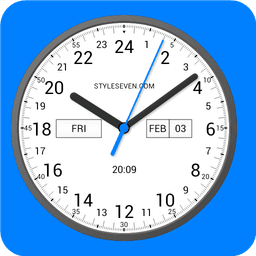
Analog Clock 24-7 is a versatile analog clock app that puts a fully customizable timepiece at your fingertips—available as a live wallpaper, always-on display, overlay widget, or full-screen application. Whether you prefer a traditional 12-hour dial or a modern 24-hour display, this clock adapts to your needs with precision and style.
Display time your way with flexible configuration options. Choose between 12-hour and 24-hour formats, select light or dark visual themes, and customize colors to match your device aesthetic. The clock shows the current date, day of the week, month, digital time, and battery charge—all movable to your preferred positions on the dial. Toggle a second hand, adjust fonts from five different styles, add a custom background image, and enable voice hints to hear the time spoken aloud. For 24-hour dials, the hour hand completes one full revolution over the entire day, giving you a unique perspective on time progression.
Use Analog Clock 24-7 as a live wallpaper on your home screen with adjustable size and positioning. Transform your device into a full-screen clock display while keeping your screen active—ideal for desks, bedside tables, or workspaces. Set the clock as a topmost overlay that floats above all other applications, freely repositionable through drag-and-drop and resizable to your preference. When your device charges, activate the screensaver mode to display your clock elegantly during downtime.
Extend battery life with Night Clock, a specialized mode featuring a dark background and muted gray hands that consume minimal power while maintaining visibility. The random position feature shifts the clock every minute, protecting your screen from burn-in damage—a critical feature for always-on displays. Access Always on Display emulation to keep your clock visible even when the screen appears off, complete with brightness control and auto-lock functionality for seamless operation. Note that Always on Display requires manual activation from fullscreen mode.
Personalize every detail through comprehensive settings. Display 12 or 24 on the dial bottom, show 0 instead of 24, display 13–24 hours on a 12-hour dial, or hide hands temporarily by double-tapping for clearer information viewing. All modes—fullscreen, live wallpaper, and screensaver—support these customizations. The app respects your device's native language for month and day names and supports both 12-hour and 24-hour digital clock formats globally.
Anolog Clock 24-7 combines functionality with aesthetic flexibility, making it the perfect choice for anyone seeking a reliable, customizable analog clock solution.
Pros & Cons
Pros
- Multiple display modes (live wallpaper, overlay, fullscreen, screensaver) suit different use cases
- Extensive customization options including 12/24-hour formats, colors, fonts, and element positioning
- Night Clock mode with burn-in protection and minimal power consumption for always-on use
- Voice hints announce the time aloud for hands-free time checking
Cons
- Always on Display emulation requires manual activation from fullscreen mode each time
- Keeping screen continuously active in fullscreen or always-on modes will drain battery significantly
- Live wallpaper and overlay modes may compete with other widgets for system resources and stability
- Limited to Android platform with no iOS or desktop equivalent available
Related Apps

Microsoft PowerToys
Windows utilities and productivity tools — enhance your workflow with system tools, window management, and file preview features.

Windows Essentials 2012
Email, messaging, photo editing, video creation, and cloud storage—Windows Essentials 2012 includes all the productivity tools you need.

Free Download Manager
Download manager that speeds up transfers, organizes files by type, and syncs with Firefox and Chrome.

HWiNFO
Hardware monitoring for Windows—track CPU temp, GPU load, fan speed, voltage in real time.

TransMac
Read Mac drives and DMG files on Windows. Access APFS/HFS+ storage and create disk images.

TestDisk & PhotoRec
Recover lost files and repair disk partitions — free open-source data recovery tool for Windows.
Latest Articles

Play a free Color Ball Sort Puzzle-style game in your browser (no download)
Oct 6, 2026

Play a free Beach Buggy Racing-style kart racer in your browser (no download)
Oct 6, 2026

Play a free Alto's Adventure-style game in your browser (no download)
Oct 6, 2026

Free online whiteboard like Jamboard: use Quickboard in your browser, no signup
Oct 6, 2026

Free online running pace calculator: splits, race predictor and daily challenge, no download
Oct 6, 2026